
How to pair or re-pair the Eau remoteUpdated 4 months ago
The Eau remote pairs automatically when you first plug in the toilet. If it stops responding or you've replaced your remote, pairing it takes about 30 seconds.
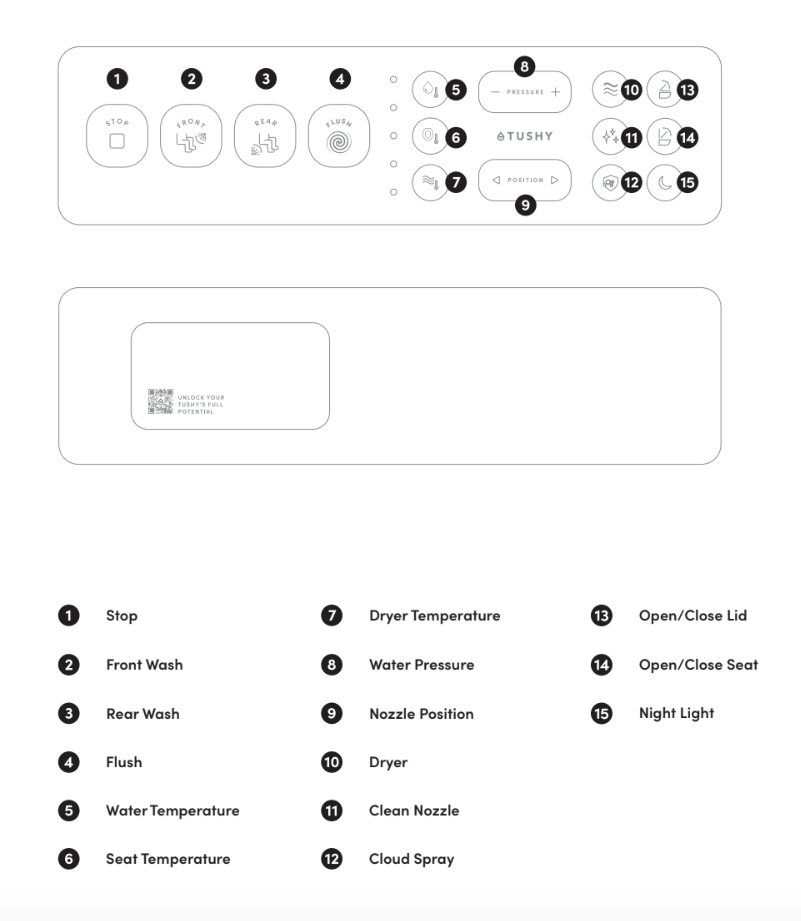
How to re-pair the remote
- Unplug the Eau's power cord from the outlet.
- Press and hold the Stop button on the remote until the indicator lights on the battery side start flashing.
- Keep the remote close to the toilet (within a few feet).
- Plug the power cord back in.
- Pairing is complete when the indicator lights stop flashing.
Test it by sitting on the seat and pressing any function button.
Still not responding?
Before re-pairing, check these first:
- Dead batteries? Replace with fresh AAA batteries and check that the indicator lights turn on.
- No power to the toilet? The remote can't communicate if the unit isn't plugged in. Check the outlet and reset the GFCI if needed.
- Seat sensor issue? The Eau only activates wash functions while someone is seated. Adjust your position to fully cover the seat sensor on the left front side of the seat.
→ See: Help! My Eau by TUSHY remote isn't working for a full troubleshooting walkthrough.
Still need help? Contact our Poo-Rus, and we'll sort it out!