.png)
How to adjust Eau by TUSHY's wash settingsUpdated 5 months ago
The Eau by TUSHY Smart Toilet is built around the idea that everyone's backside is different. Between the remote and the Side Control Knob, you have full control over how your wash feels from water temperature, pressure, nozzle position, spray mode, and more. Here's a full guide to dialing it all in.
The Two Ways to Control Your Wash
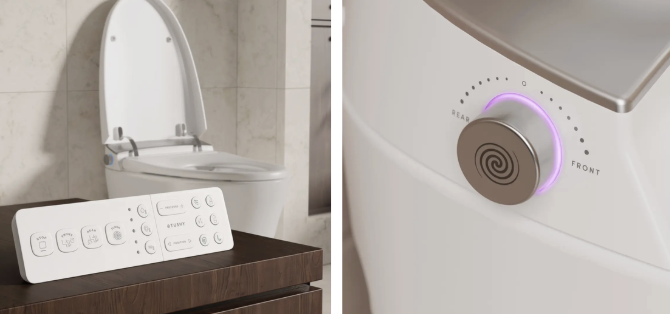
You can adjust settings using either the remote or the Side Control Knob on the toilet itself. Both work while a wash is active.
- Remote: Full control over all settings before and during a wash.
- Side Control Knob: Quick pressure adjustment during an active wash. Turn forward to increase pressure, backward to decrease. Press the button to stop.
Starting a Wash
Rear Wash
Press the Rear Wash button on the remote to clean your rear. Each cycle runs for up to 4 minutes — press Stop at any time to end it early.
- Press Rear Wash once: nozzle sprays at a fixed position.
- Press again: nozzle moves back and forth (oscillating massage) at a short range.
- Press again: nozzle moves at a longer range.
- Press again: nozzle returns to a fixed position.
Special mode — Adjustable Halo Spray: Hold the Rear Wash button for 3 seconds to activate. The spray width cycles between 3 different pressure settings for a wider coverage pattern. Hold for 3 seconds again to exit.
Front Wash
Press the Front Wash button for feminine cleansing. Works the same way as Rear Wash — press repeatedly to cycle through fixed, short oscillation, long oscillation, and back to fixed.
Water Temperature
Press the Water Temperature button to cycle through 6 settings:
- OFF — Room temperature (unheated)
- 1 light — 88°F
- 2 lights — 91°F
- 3 lights — 95°F
- 4 lights — 99°F
- 5 lights — 102°F
The number of indicator lights on the remote shows your current setting. Start lower and work your way up — finding your ideal temperature takes one or two sessions.
💦 Tip: If the water ever feels unexpectedly hot, check that the Eau is connected to your cold water supply (not warm) and reduce the temperature setting on the remote.
Water Pressure
Press the Water Pressure button on the remote to choose from 5 pressure levels. You can also adjust pressure mid-wash using the Side Control Knob — rotate forward to increase, backward to decrease.
💦 Note: At the highest pressure setting (level 5), the Eau uses an internal air pump to boost spray strength. This can cause a pulsing or sputtering sound — that's completely normal. Drop to level 4 for a smoother, quieter stream.
Nozzle Position
Press the Nozzle Position button to shift the nozzle's forward and backward angle. There are 5 positions — adjust until the spray hits exactly the right spot. This setting is personal and worth spending a moment to get right.
Seat Temperature
Press the Seat Temperature button to warm the seat. Cycles through 6 settings:
- OFF — Room temperature
- 1 light — 88°F
- 2 lights — 91°F
- 3 lights — 95°F
- 4 lights — 99°F
- 5 lights — 102°F
Special mode — Eco Mode: Hold the Seat Temperature button for 5 seconds to toggle Eco Mode. When active, the seat only heats while someone is sitting on it (saving energy when idle). The side light turns blue in Eco Mode. Hold again to turn Eco Mode off (two beeps).
Warm Air Dryer
Press the Dryer button after your wash to dry off hands-free. Press again for more airflow — there are 3 airflow levels. Each dryer cycle runs up to 4 minutes; press Stop to end early.
Dryer temperature cycles through 6 settings:
- OFF — Room temperature
- 1 light — 95°F
- 2 lights — 104°F
- 3 lights — 113°F
- 4 lights — 122°F
- 5 lights — 131°F
Additional Settings & Features
Sound (Beeping On/Off)
Hold the Water Temperature button for 5 seconds to toggle the unit's beeping sounds. Two beeps = sound off; one beep = sound on.
Night Light
Press the Night Light button to toggle the internal bowl light on or off. Hold for 5 seconds to also toggle the side light, Kick Button light, and display.
Nozzle Self-Clean
Press the Clean Nozzle button to run an automatic nozzle cleaning cycle. To clean manually, hold the Dryer Temperature button for 5 seconds (without sitting on the seat) — the nozzle will extend so you can clean it with a soft brush. Press Stop to retract.
Auto Deodorizer
The auto deodorizer activates automatically whenever you sit down and runs for 3 minutes after you leave. There's no button for this — it's always on.
Using the Side Control Knob
The Side Control Knob on the toilet body is a quick-access alternative to the remote:
- Turn forward: Start Front Wash
- Turn backward: Start Rear Wash
- During a wash — turn forward: increase pressure
- During a wash — turn backward: decrease pressure
- Press: Stop current function
- Hold: Turn the unit off
Settings Tips
- Your settings don't save automatically between sessions. Eau resets to defaults each time. Adjust at the start of each use until you find your go-to combination.
- If you share the toilet with others, the Side Control Knob is the fastest way to make quick pressure adjustments mid-wash without reaching for the remote.
- For children, seniors, or anyone with sensitive skin: start with lower temperature and pressure settings and increase gradually.
Need Help? Our Poo-Ru team is always ready!