
How to adjust Eau by TUSHY's auto open/close settingsUpdated 4 months ago
The Eau's Auto Open/Close feature uses a sensor to detect when you're approaching the toilet and opens the lid automatically — no hands, no touching. Here's how to turn it on or off and adjust how it behaves.
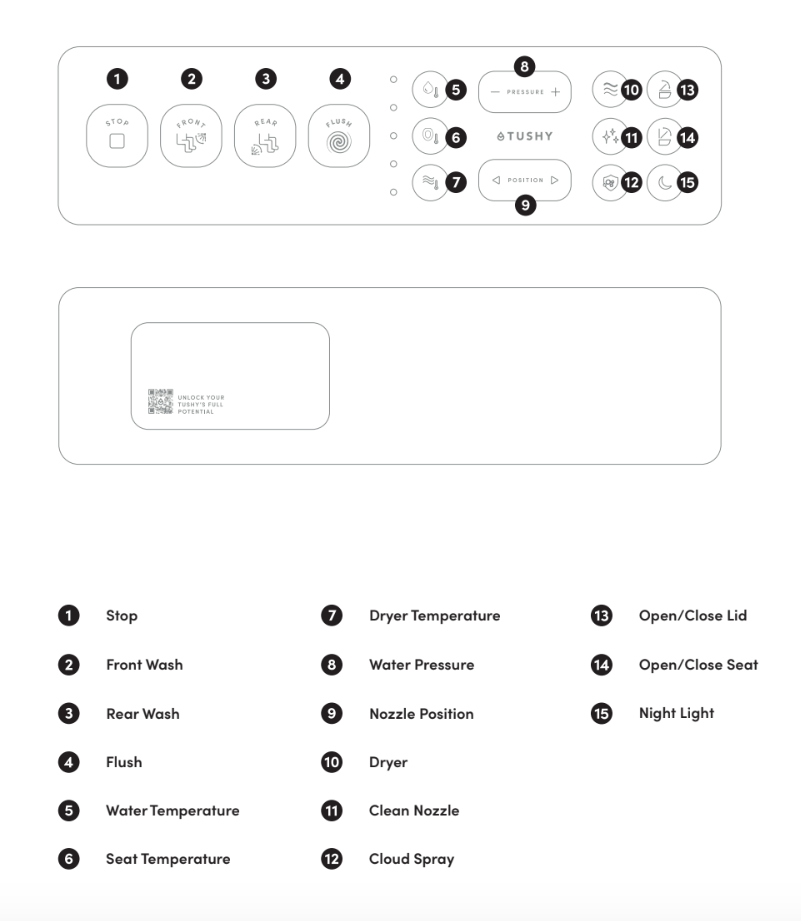
Turning Auto Open/Close on or off
For the lid: Hold the Open/Close Lid button on your remote for 5 seconds. The unit will beep twice when Auto Open/Close is turned off, and once when it's turned on.
For both lid and seat: Hold the Open/Close Seat button for 5 seconds. This toggles the setting that opens both the lid and seat together when you approach. The unit will beep when the setting changes.
What the kick button does
The kick button (at the base of the unit) works independently from Auto Open/Close:
- Lid and seat closed → one kick opens the lid; kick again to open the seat.
- Lid and seat open → one kick closes both and triggers a flush.
→ See: How to use Eau by TUSHY's kick button
Troubleshooting: Auto Open/Close stopped working
If the lid or seat isn't opening automatically when you approach:
- Check that Auto Open/Close is enabled (hold the Lid button for 5 seconds to toggle).
- Make sure you're approaching from the front — the sensor is directional.
- Power cycle the unit: unplug, wait 30 seconds, plug back in.
→ See: My Eau by TUSHY's seat or lid isn't opening/closing automatically
Questions? Reach out to our Poo-Rus!